
Coach
An AI fitness coach that tells you why.
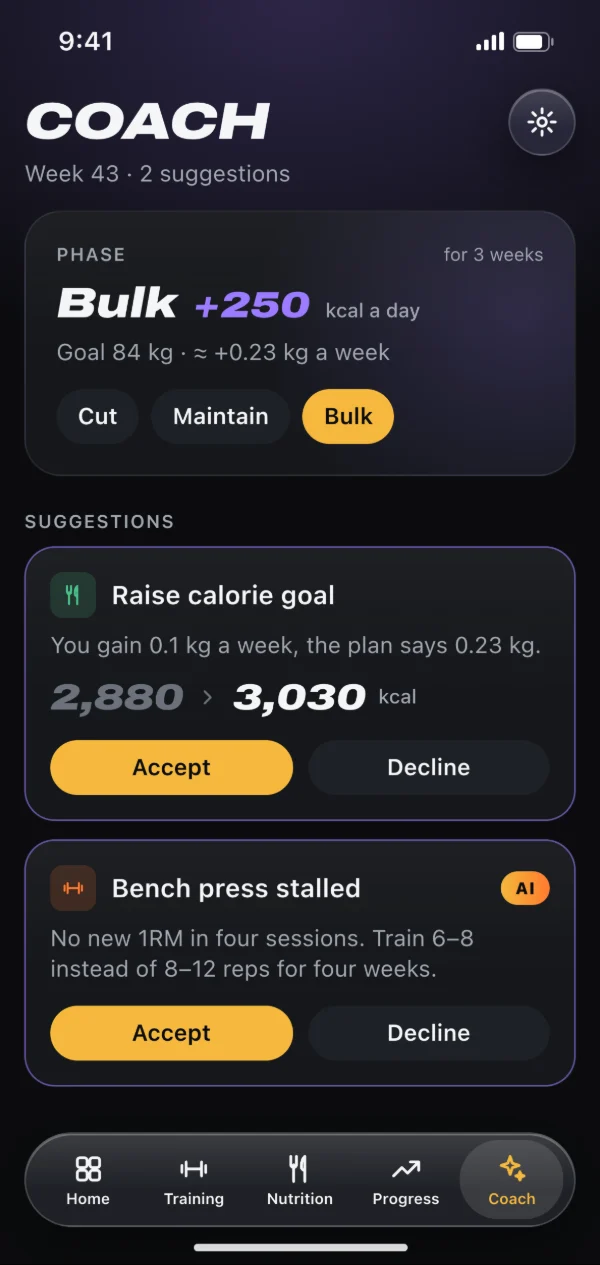
The coach in Gainsmith is an AI fitness coach that works with your real numbers. It looks at your training, nutrition and weight and only speaks up when it has something concrete: a suggestion with a reason, the exact change, and two buttons, reject or accept.
Fixed rules first, AI where it helps
Most suggestions come from fixed rules that run on your device. The AI steps in when an exercise has stalled for about three weeks: then Claude by Anthropic picks a suitable exercise swap or a different rep range. Those suggestions carry an “AI” badge. The coach never suggests weights; the progression in your plan takes care of that.
Training: sets, deloads and plateaus
If you’re losing strength or keep getting sore, the coach suggests one set fewer. If your sets are clearly too easy during a bulk, one more. When strength loss meets poor recovery, it suggests a seven-day deload. Accept a training suggestion and it becomes a new version of your plan, while the old one stays exactly as you trained it.
- No more than three new suggestions a week
- A rejected suggestion stays away for four weeks
- Open suggestions expire after two weeks
Nutrition: a calorie goal that adapts
With a phase, either bulk, maintenance or cut, the coach compares your weight trend with what that phase should bring. If it’s clearly off after at least 14 days, it suggests a new calorie goal, by no more than 250 kcal at a time and never below your basal metabolic rate. Once you reach your goal weight or end date, it suggests switching to maintenance. This part works without any AI.
Questions about your progress photos
On a progress photo or a before-and-after comparison, tap “Ask the coach” and type your question. If you want, your phase, your weight trend and your workouts per week go along. You get a careful assessment with tips back, stored only on your device. It isn’t medical advice. Before your first question the app asks for your consent once, and there’s a separate daily limit, currently three questions.
You decide what goes out
The AI features need an account and run through our server to Claude by Anthropic. Only what needs to be analysed goes there, such as the stalled exercise and its sets. The coach only sends sleep, HRV, resting heart rate or mood if you allow “Send health values to the AI”; otherwise just whether a value stands out. Our server doesn’t store photos or texts. You switch the “Training coach” and the “Nutrition coach” off separately.
How to get started
Set up a plan in Gainsmith and log your workouts. The coach needs a few weeks of history.
Pick a phase under Nutrition → Goals if you want the coach to keep an eye on your calorie goal too.
Once a week the coach takes a look. You find open suggestions on the home screen and on the coach page.
Frequently asked questions
Does the AI coach replace a personal trainer?
Does the coach change my plan by itself?
Which AI does Gainsmith use?
Does the coach work offline?
How often does the coach get in touch?
Related features
Workout tracker
Plans with progression, sets prefilled with your last numbers and PRs for every exercise. Plus a way over from Hevy or Strong.
Calorie counter
Search foods, type in a barcode or describe your meal. Calories and macros with goals for training and rest days.
Private fitness app
Your data on your device first, no ads and no trackers. Cloud photos and AI only when you use them.
Try it with your next workout.
Gainsmith is free in your browser, with no ads and no tracking. All your account needs is an email address. The iPhone and Android apps are on their way.